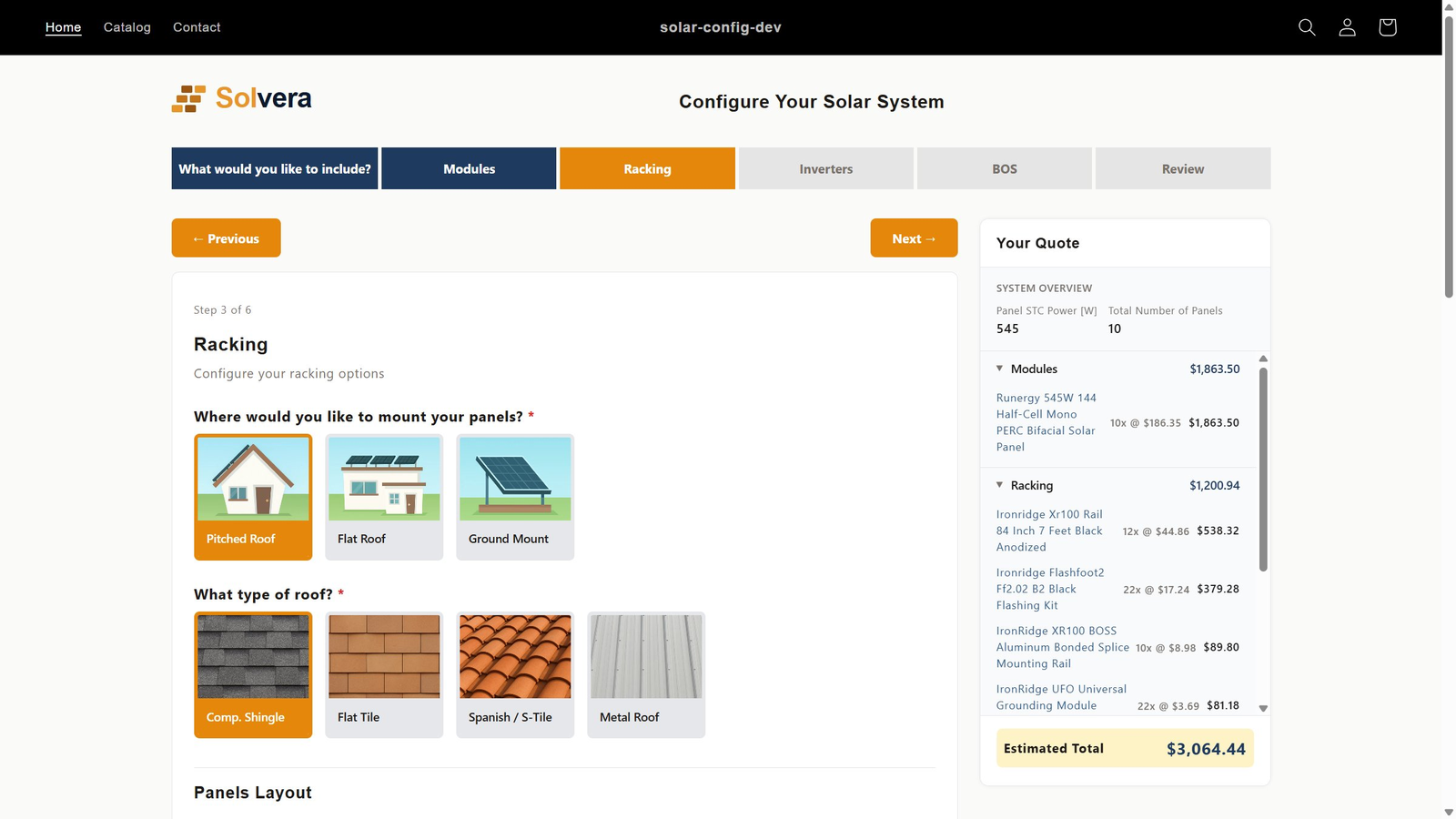
Solvera gives your customers a guided, step-by-step way to configure a solar system on your Shopify store. They move through panels, racking, inverters, and balance-of-system one decision at a time, with each step shaped by the last and a live bill of materials updating as they go. It is the configuration experience that turns a browser into a buyer. Built for solar distributors and resellers on Shopify.
Dropping a customer into a wall of products and asking them to figure out what works is how you lose the sale. A configurator guides them through one decision at a time, so the path from first choice to finished system feels obvious.
The flow walks customers through panels, then racking, then inverters, then BOS, drawing from your Shopify catalog. Each step is framed by the last, so they are never staring at choices that do not apply yet.
Behind the simple flow, Solvera handles panels-per-microinverter limits, string sizing with temperature derating, racking quantities, and rapid shutdown matching. The customer just keeps moving forward.
A live bill of materials sits alongside the flow and updates on every choice, so customers can see the system taking shape instead of wondering what they have committed to.
You can change any question, label, or step in the flow through the on-storefront editor, no developer needed, so the configuration experience matches how your customers actually shop.
A good configurator is not a form. It walks the customer through the decisions in the right order and quietly handles the engineering so they never hit a dead end.
a guided flow through panels, racking, inverters, and BOS, with each choice narrowing the next
bill of materials that updates on every selection, so the customer always sees what they are building
incompatible combinations are filtered out as the customer moves, so the flow never produces an invalid system
This is what makes Solvera different from a generic configurator. The customer-facing configurator and the sales rep workspace are the same engine, not two disconnected tools.
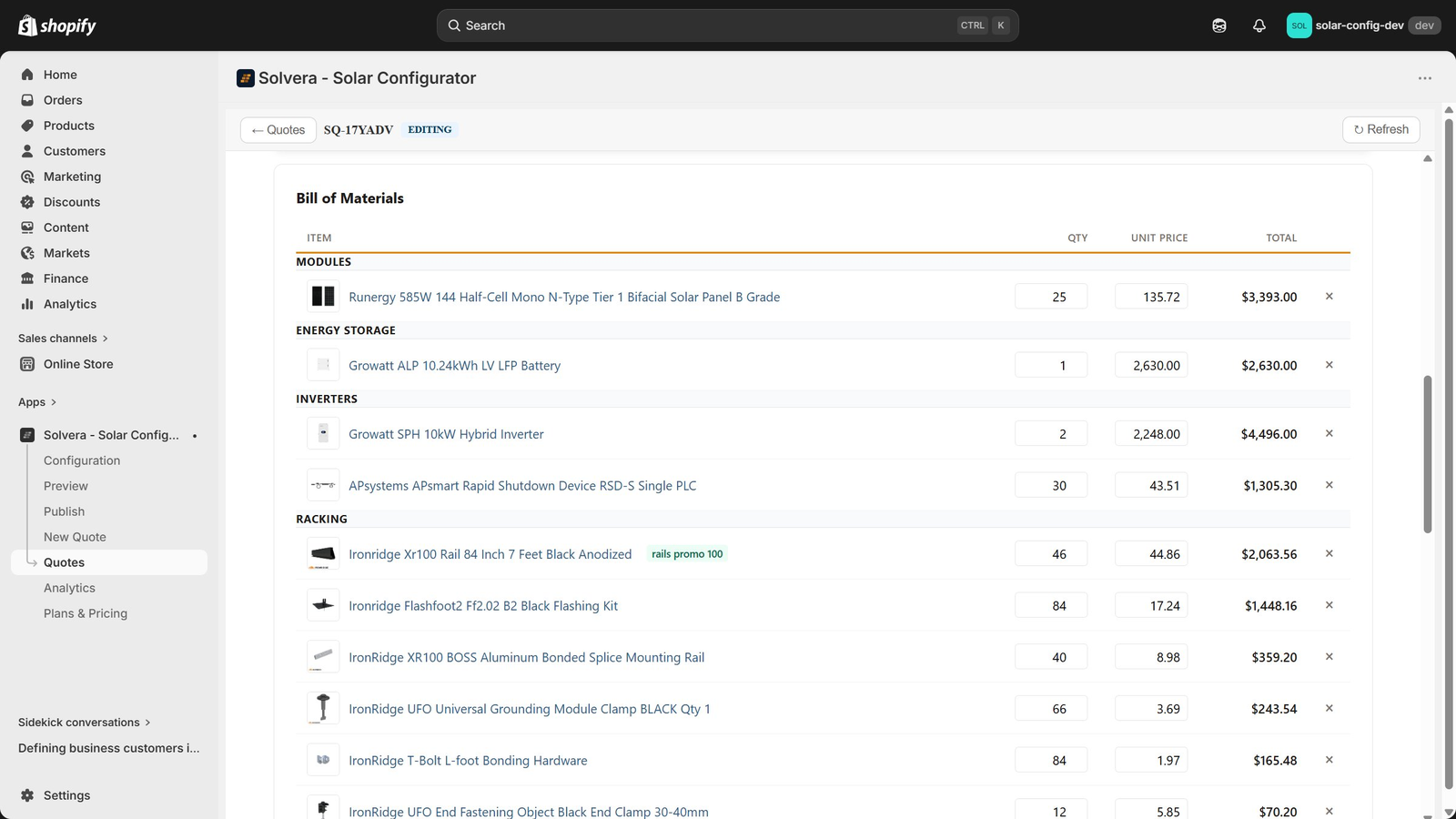
Customers configure systems themselves on your storefront. When an account needs a hand, a sales rep opens the same quote in sales mode, adjusts quantities and line items, adds sales-only products, and sends a branded proposal. Nothing is rebuilt and nothing is lost in translation between self-serve and assisted selling. One configurator covers both.
See how it works in Quotes and sales mode.
The same configurator serves three audiences, each with a different reason to care.
You can list solar products and hope customers work it out, or you can guide them. The difference shows up in how many finish with something they can buy.
| Capability | Generic configurator | Solvera |
|---|---|---|
| How the customer chooses | Scrolls a product list | Guided step-by-step flow |
| Order of decisions | Up to the customer | Sequenced so each step fits the last |
| Invalid combinations | Possible and common | Filtered out as they go |
| Seeing the system | Not until checkout | Live bill of materials throughout |
| Where they get stuck | Dead ends and guesswork | Always a clear next step |
| Result | Abandoned carts | Finished, buyable systems |
A solar configurator guides a customer through selecting compatible components, panels, racking, inverters, and balance-of-system, and assembles them into a complete system with a priced bill of materials. Solvera runs that configurator directly on your Shopify storefront, using your own catalog.
Solvera applies string sizing with temperature derating based on the panels and inverter selected, so the strings it proposes stay within the inverter's voltage window across your temperature range. The calculation updates as the customer changes selections.
Yes. Solvera handles microinverter setups, including panels-per-microinverter limits and trunk cable selection, as well as string inverter setups with string sizing. You add the products and the configurator applies the right rules.
Yes. Customers configure a system on your storefront and then email themselves a branded quote, share a link, or add the full system to cart and check out natively in Shopify.
Yes. In sales mode, a rep opens the same configuration, adjusts quantities and line items, adds sales-only products, and sends a branded proposal. Self-service and assisted selling share one engine.
Yes. Solvera is manufacturer-agnostic and uses your existing Shopify products. Prices, images, and inventory come from Shopify. You set the compatibility and quantity rules.
More in the full FAQ, the calculations and formulas guide, and the product catalog docs. See pricing for plan details, or the solar software overview for how Solvera's configurator, quoting, and system builder fit together.
Solvera is live on the Shopify App Store. Install it on your store and start with a 30-day free trial.
Install on the Shopify App StoreAsk Solvera
Answers about the product, pricing, and setup