API and integrations
API access is a Professional tier feature. You manage keys and webhooks on the API Access page: open Configuration in the app's left navigation, then API Access under Settings.
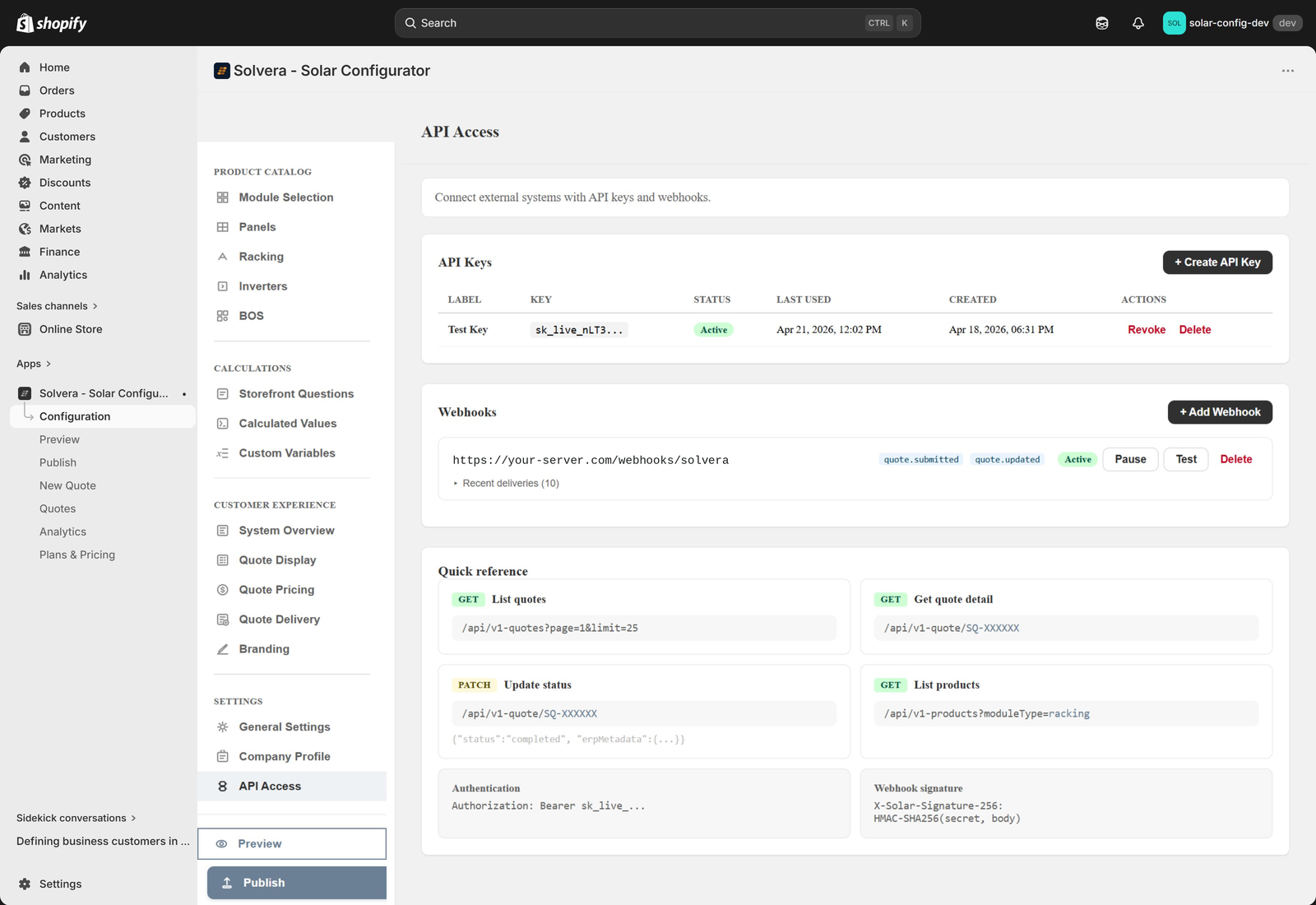
What you can do
- Read quotes: list quotes with filters, and fetch the full detail of any quote including its complete bill of materials.
- Update quotes: change a quote's status and attach your own ERP metadata (for example an ERP order ID).
- Read products: pull your configurator product catalog grouped by item type.
- Receive webhooks: get a real time notification when a quote is submitted, sent, viewed, or has its status changed.
Creating an API key
- Open Configuration, then API Access under Settings.
- Click Create API Key and give it a label, for example "ERP Integration".
- Copy the key immediately. It is shown only once.
A key looks like sk_live_ followed by a random string. Include it as a Bearer token in the Authorization header of every request:
Authorization: Bearer sk_live_your_key_hereEndpoints in brief
All requests use HTTPS and JSON. The base URL is your Shopify store domain.
| Method and path | Purpose |
|---|---|
GET /api/v1-quotes |
List quotes (paginated, with filters for status, source, search, and date range). |
GET /api/v1-quote/{quoteRef} |
Get full quote detail including the BOM snapshot. |
PATCH /api/v1-quote/{quoteRef} |
Update a quote's status and ERP metadata. |
GET /api/v1-products |
List catalog products for a module type, grouped by item type. |
The ERP metadata field is a dedicated storage area for your external system data. It is kept separate from the quote's internal data so it cannot be overwritten by other operations.
GET /api/v1-quotes returns the same set the admin Quotes list shows by default, which leaves out quotes whose only activity is a customer adding the system to the cart. Those rows carry no customer contact details.
Quote fields worth knowing
totalPriceis the items subtotal. When Quote Pricing is configured, the tax, shipping, and surcharge breakdown and the estimated total the customer saw are inmetadata.pricingConfig,metadata.pricingOverrides, andmetadata.grandTotal.metadata.grandTotalis absent when the shop has no Quote Pricing.zipCodeis the customer's ZIP or postal code, ornull. It is set only when the merchant enabled the optional field in Quote Delivery and the customer supplied one. The same field appears in webhook payloads.metadatais managed by Solvera and may be overwritten. Write your own data toerpMetadatathrough the PATCH endpoint.
Webhooks
Webhooks send a POST notification to your server when a quote event happens. Configure them on the same API Access page.
| Event | When it fires |
|---|---|
quote.submitted |
A customer submits a quote on the storefront. |
quote.sent |
A sales rep emails a quote. |
quote.viewed |
A customer opens a shared quote link. |
quote.status_changed |
A quote's status is updated through the API. |
Each delivery includes an HMAC SHA256 signature header so you can verify the payload is authentic using the signing secret shown when you create the webhook. Deliveries time out after 5 seconds, are not retried, and are awaited before the customer's quote submission completes, so your handler's response time is added to their wait. Verify the signature, respond with 202 immediately, and do the work asynchronously; anything slower than 5 seconds is logged as failed even if your server finishes it later. Make handlers idempotent on quoteRef so a replayed event cannot create duplicates. Multiple subscribers are notified in parallel, and failed deliveries are logged in the admin so you can review them. Use the Test button to send a sample payload to your endpoint.
Common integration pattern: push quotes to your ERP
- Subscribe to the
quote.submittedwebhook. - When your endpoint receives the event, read the bill of materials from the payload.
- Create the corresponding order in your ERP.
- Call
PATCH /api/v1-quote/{quoteRef}to store your ERP order ID and set the status. - When the order ships or completes, update the status again.
Security notes
- The API is server to server only. Never use your API key in client side or browser JavaScript.
- Store keys in environment variables, not in source code.
- Rotate keys by creating a new one, updating your integration, then revoking the old one.
- Always verify webhook signatures.
For full request and response schemas, query parameters, error codes, and language specific signature verification examples, see the complete API Reference.