API and integrations
API access is a Professional tier feature. You manage keys and webhooks on the API Access page: open Configuration in the app's left navigation, then API Access under Settings.
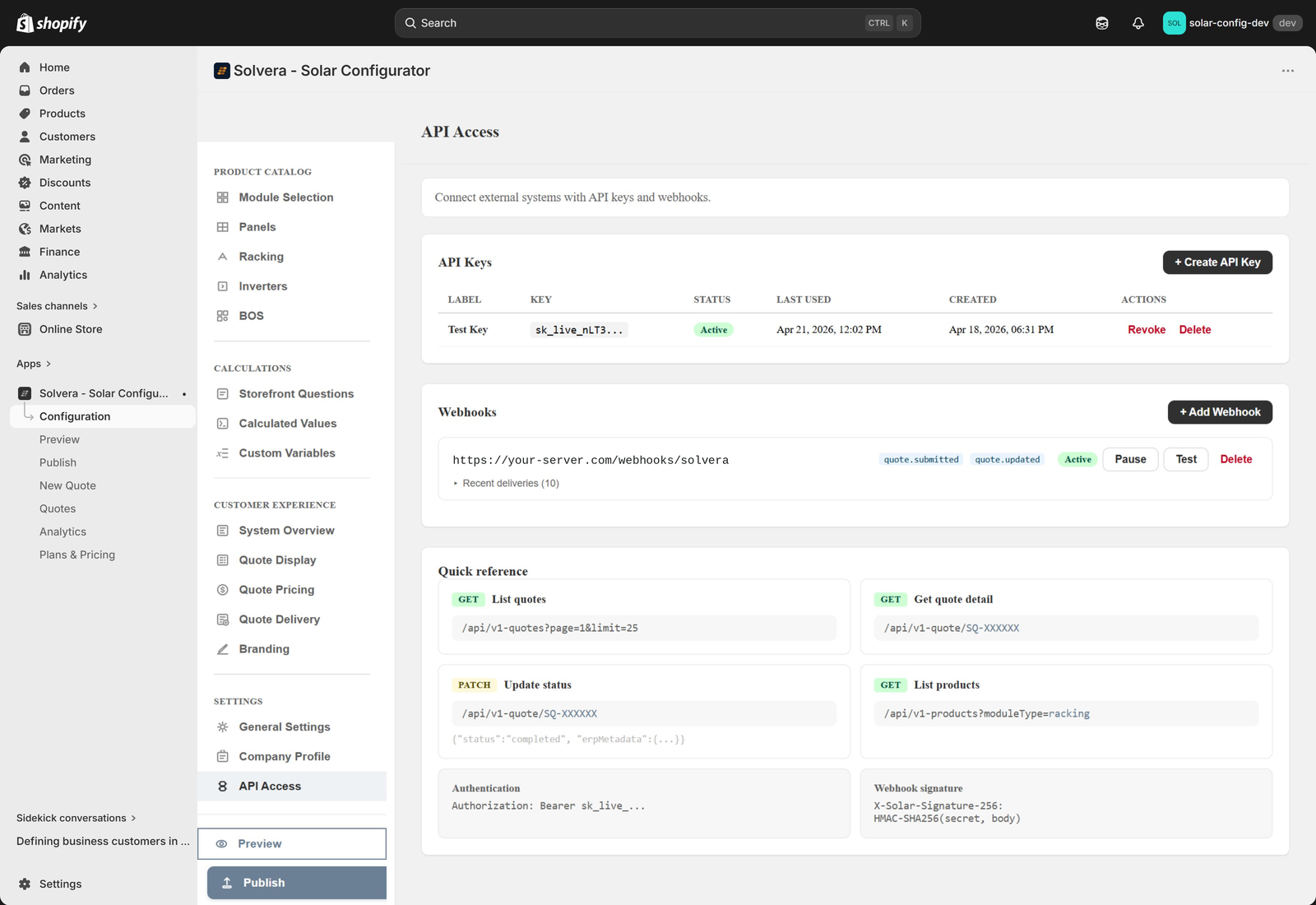
What you can do
- Read quotes: list quotes with filters, and fetch the full detail of any quote including its complete bill of materials.
- Update quotes: change a quote's status and attach your own ERP metadata (for example an ERP order ID).
- Read products: pull your configurator product catalog grouped by item type.
- Receive webhooks: get a real time notification when a quote is submitted, sent, viewed, or has its status changed.
Creating an API key
- Open Configuration, then API Access under Settings.
- Click Create API Key and give it a label, for example "ERP Integration".
- Copy the key immediately. It is shown only once.
A key looks like sk_live_ followed by a random string. Include it as a Bearer token in the Authorization header of every request:
Authorization: Bearer sk_live_your_key_hereEndpoints in brief
All requests use HTTPS and JSON. The base URL is your Shopify store domain.
| Method and path | Purpose |
|---|---|
GET /api/v1-quotes |
List quotes (paginated, with filters for status, source, search, and date range). |
GET /api/v1-quote/{quoteRef} |
Get full quote detail including the BOM snapshot. |
PATCH /api/v1-quote/{quoteRef} |
Update a quote's status and ERP metadata. |
GET /api/v1-products |
List catalog products for a module type, grouped by item type. |
The ERP metadata field is a dedicated storage area for your external system data. It is kept separate from the quote's internal data so it cannot be overwritten by other operations.
Webhooks
Webhooks send a POST notification to your server when a quote event happens. Configure them on the same API Access page.
| Event | When it fires |
|---|---|
quote.submitted |
A customer submits a quote on the storefront. |
quote.sent |
A sales rep emails a quote. |
quote.viewed |
A customer opens a shared quote link. |
quote.status_changed |
A quote's status is updated through the API. |
Each delivery includes an HMAC SHA256 signature header so you can verify the payload is authentic using the signing secret shown when you create the webhook. Deliveries time out after 5 seconds, multiple subscribers are notified in parallel, and failed deliveries are logged in the admin so you can review them. Use the Test button to send a sample payload to your endpoint.
Common integration pattern: push quotes to your ERP
- Subscribe to the
quote.submittedwebhook. - When your endpoint receives the event, read the bill of materials from the payload.
- Create the corresponding order in your ERP.
- Call
PATCH /api/v1-quote/{quoteRef}to store your ERP order ID and set the status. - When the order ships or completes, update the status again.
Security notes
- The API is server to server only. Never use your API key in client side or browser JavaScript.
- Store keys in environment variables, not in source code.
- Rotate keys by creating a new one, updating your integration, then revoking the old one.
- Always verify webhook signatures.
For full request and response schemas, query parameters, error codes, and language specific signature verification examples, see the complete API Reference.